
Premium Report - Sales by Traffic Source
Sales by Traffic Source
Similar to the default channel group (under Traffic Sources) in Google Analytics, the Traffic Source is the different channels by which customers first arrive at your site before placing an order from the store.
Found in the Marketing section, this report is useful to get a general sense of where your customers come from so you can adjust your marketing efforts accordingly.
As a Premium Report, this is available on all Paid Plans of Report Toaster. If you aren't signed up, follow these steps here to upgrade your account.
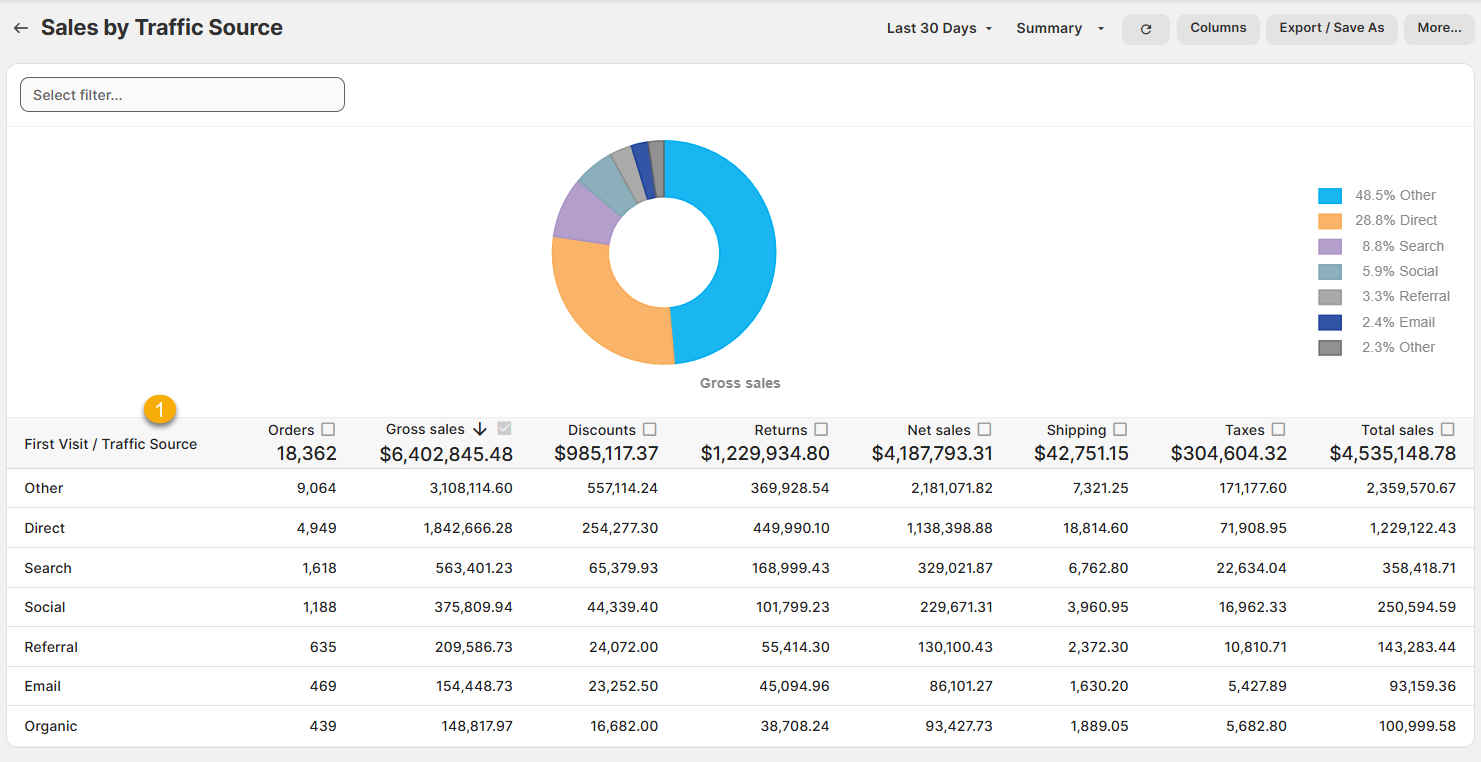
(click image to enlarge)
Here is what you need to know to understand the Sales by Traffic Source report
1.) Traffic Source: The channel group that categorizes each of your customers according to how they first came to your site.
Note that this is not a field provided to us from either Google or Shopify.
Rather, it is a custom field that categorizes your traffic based on a combination of several different fields that Shopify provides (First Visit Source/Source Type and Referring Sit/Referrer URL) on any given order.
Note that while the report itself is sorted by Gross Sales (high to low), the Traffic Source field proceeds through the checklist in this order, working from more specific to more general.
Direct - If firstVisit.source is "direct".
Email - If firstVisit.source is "email".
Organic - If firstVisit.sourceType is "SEO".
Social - If firstVisit.source contains a major social network (e.g., Facebook, Twitter, TikTok).
Search - If firstVisit.source contains a major search engine (e.g., Google, Bing, DuckDuckGo).
Referral - If either referring_site or referrer URL is set (not null).
Other - Default category if none of the above match.
Other will tend to be the largest category by volume, as any traffic that lacks sufficient referral information will be bucketed here.
For example, the referring site will be set on a lot of traffic that gets referred to your site.
However, an order will only be classified under "Referral" if none of the other groups above (e.g. Direct, Email, Organic etc) apply.
From here, you can then add various columns (like Referring Site and the other First Visit fields (Source, Source Type, Referring URL) to dig into the details.
Like all Report Toaster reports, these reports are fully customizable - so you can adjust the date range, add/remove columns, introduce a filter or change the sort to suit your individual needs. See our basic guides here for more information
For other premium reports that can be added to your account, check out our main list here.